This is a private group which will use the Signal App to share information to everyone who wants to join. It is secure and private. You will not be able to send messages in this group, but please use it to receive all the latest information from our Parish (Our Lady’s, St. Gregory’s and St. Mary’s).
First use this link on your mobile phone to download and install the Signal App.
Install the Signal App (for Android or iPhone)
When you are installing you will have an option to keep your details private, look out for this and turn this on if you would prefer others not to be able to see your mobile telephone number.
You can hide your mobile number in Signal at any time. Just open the Signal app on iPhone or Android and tap the profile icon in the top-left corner (usually your initials).
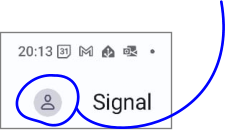
Now go to Privacy > Phone Number. Under Who Can See My Number, select Nobody (this option is enabled by default). Next, you should select ‘Nobody’ under Who Can Find Me By Number.
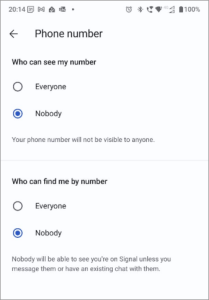
This option is set to Everybody by default, a move to make it easier for people to find you on Signal. If you disable this, new contacts won’t be able to ping your phone number for Signal messages or calls.
Once you have signed up to Signal you should CLOSE THE SIGNAL APP then you can use your mobile phone to click the link below to join the Signal information group for St. Catherine of Alexandria.
Click this link to join the Parish Signal group
Please follow any on-screen instructions.
Before you can see any messages your request will need to be approved by one of the Admins, so please be patient. You will not need to keep your phone on and you will be added as soon as possible.